Showing posts with label research hints. Show all posts

Saturday, September 5, 2015

Drilling Down to Uz

Copyright 2015, CABS for Reflections From the Fence

I have not always been a supporter of the way Ancestry.com does things.  I have complained, whined and even blogged about them now and then.  I finally gave up complaining, used the service the best I could, and used other genie web sites as much as I could so as to try and control my blood from boiling.

Recently they added some Virginia vital records data bases and I have been back playing and grabbing information as many hours a week as I can manage.

And, recently, they brought forward a new search, a site overhaul, as it may be.

And, recently, as in this weekend, they also brought out a nice huge pile of Wills and probate stuff.

And, recently, I found myself actually liking some of the changes they made to the site.  Not necessarily the search, but, the "drill down" capabilities now found on the left side of the page, after you do a primary search.  I am sure that is not what they have named all this, it's what I call it.

I have my own method to researching at Ancestry.  I search of the minimums.  I put in as few "qualifiers" as I can.

And, this weekend doing just that, minimal searching in the new Wills and Probates data bases, I found Uz.  Yes, really Uz.

He is a Jaquis clan member from the early to mid 1800's.  My interest in the Jaquis  clan is involved with the Lashbrook clan, of course.  Uz is a brother of Benjamin H. who married Fannie Lashbrook.

I had Uz in some census enumerations, and one Civil War hint, as follows:

Uz Jaquis is found enumerated on the 1860 U.S. Census of Parishville, St. Lawrence County, New York:  Uz Jaquish, age 34, farmer, born New York.  In the same household are:  Lucy Jaquish, age 51, born Maine and Lucy Jaquish, age 73, born Connecticut.  Just a few lines up the page we find the following family:  James Jaquish, age 51, blacksmith, value of real estate $1000, value of personal property is $200., born Maine; Ann C., age 54, birth place cannot read; Cynthia, age 18, born New York; James M., age 7.  Further research may tell us who all these Jaquis ancestors are. 

Uz Jaquis, indexed Uz Jacqins at Ancestry.com, appears on the 1870 U.S. Census of Parishville, St. Lawrence County, New York:  Uz Jaquis, age 46, constable,value of real estate $2000., value of personal property $1100., born New York; Lucy, age 54, keeps house, born Maine.  Further research is required. 

U.S., Civil War Draft Registrations Records, 1863-1865 about Uy Jaquis
Name: Uy Jaquis
[Uz Jaquis]
Residence: New York
Class: 2
Congressional District: 17th
Age on 1 July 1863: 42
Race: White
Place of Birth: New York

I had never found anything about Uz's demise or final resting place.  Till the other evening.  Then, I found something.  I downloaded 9 "files".  Many of those are cover sheets and the like, but, I grabbed everything I could find.  One of my 9 downloads is his Last Will.  Guess that means I now have information on his demise, eh??  Ya!

I need to transcribe several of the documents to get a full understanding, because frankly, the handwriting is giving me a headache.

In the meantime, I thought I would show you a few screen shots on how I managed to find Uz.

NOTE:  All screen shots from Ancestry.com.  See my disclaimer page here on Reflections.  Nope, they don't ask for reviews and I surely pay my subscription fees every year.

Also note, this is not necessarily the most direct or most efficient method to search.  As with most things computer and internet, there are several ways to get to the end result.  This method could be considered a bit of a fishing expedition.

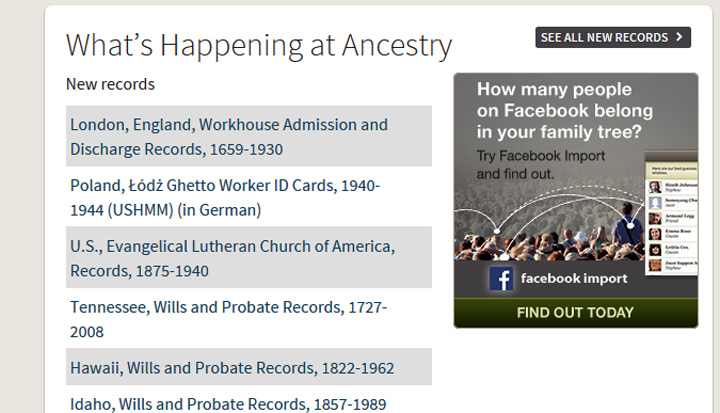
First thing you will see on the Ancestry home page right now, is this list of New records.  Of course, as they add new records you will see new data sets listed.  Right now, there are 3 at the top, and then, a lot of Wills and Probate record sets listed, Tennessee, Hawaii, Idaho, etc.  This screen shot is only part of the page, as are most of the others that follow.

Click See All New Records.  You will be taken to this screen/page:


Click on one of the new Wills and Probate Records, say, ohhhh, Iowa, the next screen will appear like this. While here I  clicked on the blue colored words at the very top: Search > Wills, Probates, Land, Tax & Criminal, it is a live link.  It is a bit difficult to see in my screen shot, it was blue when I was at Ancestry working. 


When the next screen came up, I typed the surname, Jaquis:


This search took me here.  You will note I have the search going for "Exact" matches.  With this surname at some point I will need to redo and use a less restrictive spelling choice, who knows what that will turn up.


From the left column I next clicked on the link, Wills & Probates, Estates & Guardian Records, 100 records available. That link further boiled/drilled down my choices, and this is what I found:


I chose New York, where there are 34 sets of records.  I knew there were Jaquis clan members living there, I wanted to see what this data set offered.  Scrolling down the names I find Wz, Lucy and Uz Jaquis.  


The beauty of this search of clicking to drill down to the data base I am interested in is that I find Wz and Uz. First I had no idea there was a probate file.  Second, who would search for Wz??  Not I.  Now I might after seeing the odd indexing, but, I would not have thought of THAT spelling before.

I use this drill down method at FamilySearch as well.  It serves me well.  No, I don't find everything with this drill down process, but, what I do find is frequently a nice surprise.  I love surprises.  If, I find the drill down method gives me 2500 hits, of course, I must add more "qualifiers" and re-do the search.  But, the New York Wills and Probates of Jaquis gave me only 34 hits.  Easy peasy to review 34.  

Start with less, add more if you must.  Drill down.

Good luck!  Go forth and find your "Uz".


* Remember, check out my disclaimer page.

** Yes, there are other methods to get to the New York Wills and Probates data set that probably are faster and much more efficient.  Personally I find it laborious searching through Ancestry's list of data sets, aka the card catalog.  I'll frequently take a back door approach first.  And, I wanted to show you this method.  You could just as easily type in "Jaquis" in the search engine and deal with drilling down from there.  Always more than one way to skin a cat, err, find your man, or woman, err, ancestor.

.

Monday, August 26, 2013

Can't Find That Cemetery, Here is a Trick, Icky Warning Attached

Copyright 2013, CABS for Reflections From the Fence

Here is a trick we have used several times when we are out cemetery stomping and cannot find the cemetery.

Find a funeral home (sometimes easier to find than cemeteries are) and ask directions.


Hint: stop at a LARGE funeral home, not the little hole in the walls one, like the one Man spied down in southern Georgia a few years back.   We stopped, I knocked on doors, some were locked, some open, but no one answered a very loud “Hello”.  One door in the back was partially open, only, only, only,

OK, warning: don’t read next part if you are squeamish.

Only, no one answered and we discovered it was the embalming room!

YIKES!!

Thankfully room was UNOCCUPIED!!


.

Friday, July 13, 2012

Allen County Research Trip, Moving to the Techy Side?

The research trip this week to Allen County Public Library in Fort Wayne, Indiana, the report continues:

So, even though my research results were not over the top, not breaking down any brick walls, not even putting a dent in any wooden walls, I had a great time, and the few tidbits I did find were wonderful.  I saw friends and blogger, Becky Wiseman of Kinexxions, dropped by.  Becky and I had not seen each other since May of 2011 in Salt Lake City and it was certainly good to catch up just a little.

And, there was the techy part of my experience.  I have serious love/hate relationships with all things techy.  I embrace them and I rant at them.

Most of my readers may remember that I chatted some last year about the Android tablet.  Man does my techy research and he was pretty sure that the Android was the way to go.  I was not so sure, I wanted the iPad.  He assured me the apps were coming, that it would do all I wanted, and then some.  Pricing was right, it did things he thought were important, had hardware goodies he approved of.  I wanted the iPad.  We purchased the Android.

Then, I waited for apps that I wanted, of course, my highest item on my wish list was a really good app to use with my family history data base.  There are apps, but, none of them made me over the top happy.  Over the next 10 months or so I used the Android for travel, maps in the truck connected to the net (most of the time) via the air card.  I tried several of the genie apps, I downloaded the Kindle reader and free books.  I still wanted the iPad.

The genie apps just did not thrill me.  I love multimedia in my data base.  I have well over 8,000 items, photos, documents, word processing files, sound bites, videos, all attached to my data base.  I wanted them (or most of them) on my Android.  Trouble was, the apps were not allowing me access to all of my multimedia.  Some apps allowed one photo per person.  SIGH.  I was ok with maybe not being able to access the really large word processing files, but, I was NOT happy with only being able to see one image per person.  That just left me flat.

(A bit of back story, at this time my main data base was RootsMagic.  I had been using if for years, I loved it. However, for several years I have been disappointed in a couple of issues with RM.  One was the word processor, and the other was it did not appear that RM was actively engaged with any app writers.  At least that is what it looked from where I was sitting on the fence.  Legacy, however, did have an app that it seemed to work very well on the iPad and on some Androids.  See that is another thing with the Androids, one app may work on one, but the developers cannot guarantee it will work on ALL Androids.  Yep, I wanted that iPad.

After MANY months of deep contemplation I switched my entire data base to Legacy Family Tree.  One huge factor in my change was that Families app that works with Legacy.  I am still slightly uncomfortable working in Legacy, there are a couple of small issues that I do not care for, however, I am learning, adjusting, determined to stay with it till I do feel comfortable using it.)

And, in April, we purchased the iPad.  The new one, version 3, which they call the New iPad. With 1 gig of Verizon connectivity every month.  (Man inherited the Android which he loves - - WIN!)

I am in love!  I put the non-glare screen protection on it before I ever left the store.  It works remarkably well, even in the truck in full sun.  I put Families on it, which works so well with Legacy it makes a gal's heart go pitter patter.  I have added a few other apps, including Adobe Reader.  I have the Kindle reader on it, the books all transferred just fine.  I can be online with it anywhere, any time as long as I have a cell tower that delivers.  The mapping works so much better with the built in connectivity.

And, this research trip I decided to see how much I could use the iPad and if I could do without the laptop.

How did I do??  As with many things, mixed.

Having Families meant I was able to look at my data base, anywhere, even in the stacks of the library, yes, I did that!  WIN

I made my to do list a PDF file, learned how to transfer it to the iPad, and loved having it there where I could look at it in the stacks of the library, and yes, I did that too!  WIN.

I realized that I did not like not being able to make notes on my to do list, you cannot write on a PDF document, and so, that is a NO WIN.  Contemplating sending my to do list to Evernote instead.  Or, maybe do BOTH.  Why both, well, have to say that PDF format of the to do list looked fab, and was very easy to study and read.  If it is in Evernote as well, I can make corrections or notes in Evernote as well.  Why not both??

Because I have connectivity via Verizon I was able to check my email, Facebook, Google Plus and surf the Allen County Public Library catalog, while, standing in the stacks, or sitting at my research table.  WIN.

I did some lookups for a friend, quick and easy lookups if you have access to the books in the library.   And, here is where I started thinking out of the box, err, iPad.  I decided to try using the camera on the iPad to take photos of the results I was finding for her.  I stood in the stacks and took photos.   WIN.

Here is what a photo of a page looked like, this one happened to be for some of my own research, and I have digitally edited it some for presentation here.  I cropped some of the page away, I re-sized the dpi and width and I changed from color to gray scale.  Note the book was old, the binding weak and it was quite easy to get the book and pages to lay flat.  I am perfectly happy with this image.


And, then, I had a small revelation.  I could email her those pages.  Right there, from the iPad, while in the stacks!  She was getting the emailed graphic of her lookup results before I could walk back to my seat in the library.  DOUBLE WIN!

I loved walking around the library with the iPad with my family tree on it (with ALL those multimedia events), with my to do lists, taking photos of pages out of books and emailing them to my friend while still in the stacks.  I loved being able to surf the library catalog while standing in the stacks, cause I was connected to the net.

I enjoyed taking photos of some of the images I was grabbing for myself.  That said, it is not easy for me to get a photo that is square, that needs a bit of practice.  Truthfully, if I cannot figure that out, I am not sure that in the long run it is a viable option for capturing quality images.  It is going to come down to how important is the image??  Data from a book, as long as I can read it, it does not make a lot of difference if it is square or not.  Images of photos??  That is another thing, and one I will be revisiting as I process the images I captured this trip.

For example, here is an image, I am not real happy with this, see the curve in the page.  Note:  this is a new book, stiff binding, I had other books lying under each side, trying to "get the curve out" and keep the book open.  Image was edited some, believe it was mostly auto correct and a bit of saturation increase.  If I had scanned this image with my little Cannon LiDE 210 I would have scanned one page at a time and would not have this curvature issue.


Now, I will be the first to tell you that I have not examined all the possibilities of using the iPad, in life or in research.  I am still learning, investigating.  I know several bloggers/researchers that have used their tablet for research trips or conferences and that is ALL they have used.  I am not to that point yet.  I am still using my lap top for my main work horse.  Will I ever get to that point, where I can go on a 2 day (or longer) research trip without my lap top??  Not sure.

If I cannot get images to please me, I may continue to tote along my little scanner, it does wonderful work.  That would mean I need the lap top.  I know there are files on my lap top that I will never transfer to the iPad, and I just know that there will be files on the lap top that I need when I only have the iPad in the middle of a research trip, that is Genie-Murphy at work.

So, Carol and the New iPad are moving to the techy side of onsite research, one step at a time.  Grade so far, ohhhh, A-, I was very happy with what I managed to do and learn during these 2 days of research.


* P.S.  Dear Legacy, it would be so super if you would add a count of the multimedia events to the "General Information" screen.  Maybe count my to do items, events, maybe even number of citations.  Ya, I know, I am looking at the Properties report from RootsMagic.  Really helps you keep track of your work ethic, I so miss that in Legacy.

** Disclaimer, you know the routine, Facebook, Google Plus, Evernote, Adobe Reader, Verizon, Families, Kindle, RootsMagic, Legacy Family Tree, Canon, Android, iPad and all other mentions of web sites or products are put here without any financial considerations back to Reflections.  I use the services, sometimes successfully, others, well, not so successfully.  Sometimes I speak highly of them, other times, well, I rant!
.

Tuesday, April 24, 2012

Tuesday's Tip, Visit that LOCAL Library

Copyright 2012, CABS for Reflections From the Fence

So, you think that the state library and archives and historical societies have all the goodies in their collections??  Of course not, but, let's face it their collections are fantastic, and so much fun and great stuff all in one building.  Be still our researching hearts!

Recently on our way back north from our winter escape, we headed up the east coast and I just could NOT resist a stop at Richmond Virginia and the Library of Virginia.  Yes, it was fun, yes, I found some pretty interesting stuff, yes, I   L*O*V*E the Library of Virginia.

That said, I do have a few minor issues with the collection.  The newspapers is the biggie.  For the most part they are stored on other floors in closed stacks.  A few papers are actually in the main reading room on the second floor, but, for the most part, all the papers I would want to access must be done so via the closed stacks.  Now, trying to keep this simple and short and sweet (eyes rolling), here is how that is done.  You need the name and date of the newspaper you want.  If you are lucky, the newspaper will not have changed their name very often, ya, right!  They changed those names constantly.  Each paper, for Norfolk Virginia, named differently, is cataloged differently.  Tis the right way to do things.  Tis frustrating too!

So, the first step is finding the correct newspaper for the locality you want to research in.  They have this really nifty finding aid which lists all the localities and ALL the newspapers by name and date of publication.  If you know about that little jewel of a finding aid, you can use it, to prepare to order the films from the stacks.  Ordering is done via computer (I only did once this trip and it was a FAIL) or via the reference librarians.

(Here is one small problem, not all the librarians know about the finding aid.  The majority of them do, but, not all.  So, when you go asking for the finding aid, some of them will insist there is no such thing and that all the papers are stored in those cabinets right over there, waving at the second floor storage cabinets, only as I have already explained, not ALL the newspapers for the state are there.)

So, we have the finding aid, we have figured out what newspaper we want by name, locality and date, we visit the reference desk and the librarians order the correct film.  Now we wait, for a minimum of 15 minutes, sometimes a bit more.  Sometimes you don't get the film, this happened 2 times during my recent visit, these two films were simply MIA.

When you are notified the film has been brought to the circulation desk, you go over there, check it out with your library card, (no, you MAY not leave the library with it, I have yet to figure out why the check out procedure, but, that is what you have to do) and go back into the reading room.  In the reading room you go request a microfilm reader/scanner, if it is a digitial scanner the librarian must sign you on and set it up the way you want, for example, if you want jpg format output, they must go into the software and set it up for you, it is password protected.

NOW, after all this you load the film and start the searching.  If you are on a digital scanner all you need to produce a copy is a flash/thumb drive. Once you have found your obituary or marriage notice or whatever you are looking for in the newspapers, you can copy it to your flash/thumb drive quite quickly.

When you are done with your newspaper research you gather your films and return them to the circulation desk where you hope they check them back incorrectly (2 films I used did not get checked back in correctly, causing me a tad bit of angst, sighhh).

So, you can see this is a rather slow and time consuming activity, this newspaper research at the Library of Virginia, those closed stacks, sighhh.  You will get some exercise here though, running from the reference desk to the circulation desk to the readers/scanners and back to the circulation desk.  Exercise is a good thing.

NOW, cut to the next week and Man and I are now in Rockingham County Virginia.  I still have obits to find, see, all the ones for Rockingham County, I did not pull while in Richmond.  I did not have time and I hoped I might get to them while IN Rockingham.  So, off to the library in downtown Harrisonburg.  Up on the second floor they have open stack storage for the newspapers, and they have two reader/scanner/printers.  One machine is a paper printer, no digital at all. The second machine is a digital scanner, have flash/thumb drive, will copy.  We are allowed to pull our own films, just 2 feet from the readers.  In just a few minutes over 2 hours Man and I pull and find 20 different obituaries and/or marriage anouncements.  One of those 20 was a gift, I found it on the way to something else.  We did not find 2 others we were looking for. I had to load both machines, Man will look for obits for me, but, he pretty much refuses to load the machines.  I refuse to look at gift horse in the mouth, so I stop what I am doing and load his machine.  It does interrupt the work flow a bit, but, like I said, gift horses!  LOL

There is no way I could have done this amount of work in this time frame at the Library of Virginia with the closed stacks.  I pulled 11 of those 20 items in those 2 hours at the library in Rockingham County.  The huge time saver is the fact that at the local library the films were stored in open stacks, open the drawer, find the correct date, pull the film, takes moments, just moments.

So, you do use the local libraries in your research, right??  Many of them are smaller libraries, smaller collections.  This means, in many cases, easier parking, faster access, easier access and in many cases the local libraries have items in their collections you will NOT find at the state libraries or archives.

Bottom line, a local library can be a gold mine.  Many of them have access rules (to protect the collections from theft, etc.), but if you find open stacks of film, you can really make some time, accomplish a lot in a short time, and walk away blessing open stack accessibility.

If you have not done so during research trips, visit that local library, I think you will be very glad you did.


* Source of the graphic lost to the ravages of time, found on the internet years ago, my apologies to the artist and web site.
.

Thursday, June 16, 2011

The Small To Do List - How to Stretch It

Copyright 2011, CABS for Reflections From the Fence

When I arrived in Salt Lake City I had two (2) to do lists, which, honestly, I thought were fairly pathetic.  I was pretty happy and surprised when I stretched them to last well over two weeks.  Of course, I went on a few research tangents, and ya, they took up some time.  I collected a number of digital images of documents on those tangents. YES!!

So, when I did have the lists down to about 2 or 3 items, I started snooping around the data base for additional little tidbits I would just LOVE to have.  And, I have been coming up with plenty, let me tell you.

How??

By going to other to do lists I have on my data base and reviewing them and determining what items can be done here in the research mecca.

See, in RootsMagic you can organize your to do lists by repositories.  I have done that, have repositories from Georgia to Oregon listed, just in case I ever get there.  Now for sure, there are some items on those to do lists that are only available in a specific repository, but, I am finding quite a few things that I can investigate here in Salt Lake City.

Many of the items in the left column can be done in Salt Lake, 
even if originally listed in another repository.
Another trick I have used is to list all events in a specific locality.  RootsMagic will list all events, births, marriages, deaths, burials, in a locality.  Look at what is on the list, can I grab any documents while here in the mecca?


Above:  Place list, lets have a lookie see at Adams County, Colorado.  Click and see:


Click on "Generate Report" and you will get something that looks sorta like this.  Sorta, cause if you notice the dates they are all more recent, and I cut out the names on this example for privacy purposes.
So, examine this list of events in Adams County Colorado, I ask myself, is it a documented date, do I have the certificate??  If not, will I be able to obtain it from the collection here in Salt Lake City??  This turned out to be a crummy example because I only have births in this county and the dates are all pretty recent.  But, other lists I have generated have resulted in a lot of new documents for my data base covering births, deaths, and marriages.

There are a couple of other little tricks I have used to take my 2 scrawny to do lists and fill my research time here in Salt Lake City, the research mecca.  And I never did get down to the European films floor. There were these German church records I wanted to try to get better images of - - I thought for sure by now I would have them - -

Who knew I could S-T-R-E-T-C-H two to do lists out for a month's research?  Not I.


.

Friday, August 28, 2009

Checkmate, Nope, Stalemate

It has been a long summer, Labor Day is almost upon us, and you realize your research has stalled.

Here are a few suggestions for jump starting your research.

Read Blogs, there are a great many that deal with genealogy and family history. It is amazing what you might find, tricks, new web sites, blogs that might make you cry, and some that will inspire you. Goodness, if you get lucky, you might find a long lost cousin.

Read forums, many of the great genealogy or research sites have forums (some also have blogs). Read them, learn the intricacies of each site, should help you be a more resourceful researcher in the future.

Check out Cyndi's List. You can get lost there for days, I can almost guarantee a visit at Cyndi's will jump start your research!

Review your own private library. Pull those books off the shelves, sit down and have a read.

Review your photos, are there names, dates, places identifying them all?? Should you be scanning some of them, sharing them with cousins and other family.

Review some of your files, I promise you, doing so will find documents and hints you forgot you had, or that have new meaning since you saw them last. While you are at it, scan the good stuff, and consider tossing the bad.

Go to the library, your favorite research library and browse the stacks. A leisurely stroll down the stacks is a great way to stumble into a great research find.

How bout a internet search of Persi, or pull up the online catalog to your favorite library and search for counties your ancestors lived in. I found some brand new books that way, good stuff in them too!

Go find a new search engine. There are several available, and you just might find a new bit of information by using one of them.

Just a few ideas, but should get you excited again about your research.

Now, no more stalemate - - START YOUR RESEARCH ENGINES! I wanna see genie happy dancing going on!

.